
Introduction
Redux is a library that is often used in JavaScript applications to manage the state of the application. It is particularly useful for applications that have a lot of state that needs to be managed, as well as for applications that have a lot of different components that need to access and update that state.
What is Redux
At its core, Redux is a library for managing application state. It is based on the idea of a "single source of truth" for the state of an application. This means that all state in a Redux-based application is stored in a single, global store. This store can then be accessed and updated by any component in the application.
How Does Redux Work
In a Redux-based application, the global store is created by creating an instance of the createStore function from the Redux library. This function takes a single argument, which is a function called the "reducer". The reducer is responsible for updating the state of the store in response to "actions" that are dispatched to the store.
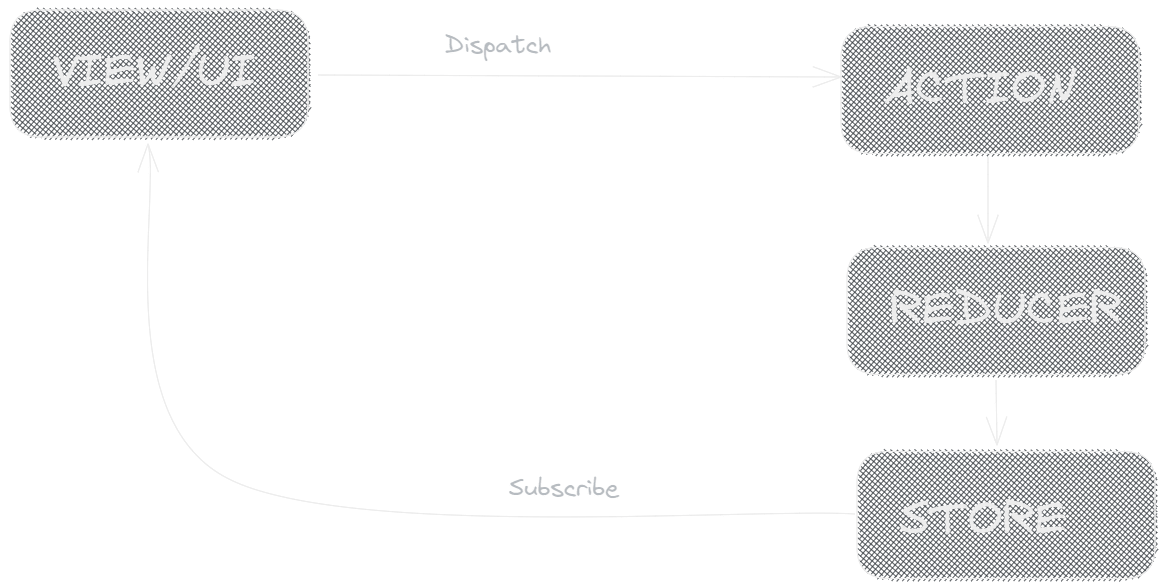
Redux flow
The Store
The store is the central repository for all the state in a Redux-based application. It is created by calling the createStore function from the Redux library and passing in a "reducer" function. The store is responsible for holding the current state of the application and providing methods for updating that state, such as dispatch and subscribe.
import { createStore } from 'redux'; // Reducer function const reducer = (state = 0, action) => { switch (action.type) { case 'INCREMENT': return state + 1; case 'DECREMENT': return state - 1; default: return state; } } // Create store const store = createStore(reducer);
Reducers
A reducer is a pure function that takes the current state of the store and an action, and returns a new state that reflects the changes made by the action. Reducers are responsible for updating the state of the store in response to actions. They are passed as an argument to the createStore function when the store is created.
import { createStore } from 'redux'; // Reducer function const reducer = (state = 0, action) => { switch (action.type) { case 'INCREMENT': return state + 1; case 'DECREMENT': return state - 1; default: return state; } }
Actions
Actions are plain JavaScript objects that describe the changes that should be made to the state of the application. They are dispatched to the store using the dispatch method, and the reducers are responsible for handling these actions and updating the state accordingly. Actions must have a type property that describes the type of action being performed, and can also include any additional data required to perform the action.
// Dispatch an action store.dispatch({ type: 'INCREMENT' }); // Dispatch another action store.dispatch({ type: 'DECREMENT' });
Using Redux in a React Application
One of the most common use cases for Redux is in React applications. In a React application, the global store can be connected to the components of the application using the connect function from the react-redux library.
The connect function takes two arguments: a mapStateToProps function, and a mapDispatchToProps function. The "mapStateToProps" function is used to map the state of the store to the props of a component, and the "mapDispatchToProps" function is used to map the dispatch function to the props of a component.
import { connect } from 'react-redux'; // Map state to props const mapStateToProps = state => { return { count: state }; } // Map dispatch to props const mapDispatchToProps = dispatch => { return { increment: () => dispatch({ type: 'INCREMENT' }), decrement: () => dispatch({ type: 'DECREMENT' }) }; } // Connect the component to the store const ConnectedCounter = connect(mapStateToProps, mapDispatchToProps)(Counter);
In this example, we have a React component called Counter that needs to access the current count from the store and also update the count by dispatching an action. Using the connect function, we create a new component called ConnectedCounter that is connected to the store. The mapStateToProps function maps the state of the store to the count prop of the component, and the mapDispatchToProps function maps the increment and decrement functions to the dispatch function. This allows the Counter component to access and update the state of the store without having to worry about the details of how the store works.
You can use the ConnectedCounter component in your application the same way you would use any other component. The component will have the count prop that reflect the current state of the store and the increment and decrement functions that allow you to update the state by dispatching actions.
By connecting the store to React components, it makes it easy to build powerful, dynamic user interfaces.
Conclusion
Redux is a powerful library for managing the state of JavaScript applications. It is particularly useful for applications that have a lot of state that needs to be managed, as well as for applications that have a lot of different components that need to access and update that state. By using the concepts of actions and reducers, Redux makes it easy to update the state of an application in a predictable and consistent way. And by connecting the store to React components, it makes it easy to build powerful, dynamic user interfaces.